For iPhone & Apple Watch

The habit tracker where every habit grows a plant

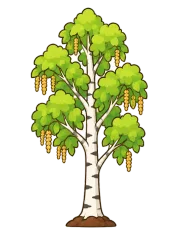
Habiroot is a habit tracker app for iPhone where every habit grows a plant. Keep a daily streak and your plant grows from a seed into a full plant. Break a bad habit and its rotten plant slowly recovers. All your plants live together in a garden island that expands as you grow.

Download on the App Store Coming soon to Google Play

Free download · iOS 17.6+ · Apple Watch · See all 27 plants · Formerly Roots – Streak Tracker

How it grows

A streak tracker you can watch grow

Check off a habit once a day and its plant moves up a stage at fixed streak lengths, from seed to full plant. Miss a whole day and the streak, and the plant, start again. Simple rules, nothing hidden.

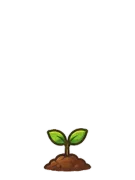
  1. Tree at stage 1: Seedling

    Start

    Seedling

  2. Tree at stage 2: Small Sapling

    3 days

    Small Sapling

  3. Tree at stage 3: Growing Sapling

    7 days

    Growing Sapling

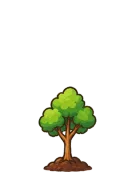
  4. Tree at stage 4: Young Tree

    14 days

    Young Tree

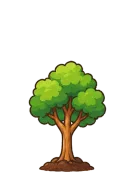
  5. Tree at stage 5: Mature Tree

    30 days

    Mature Tree

  6. Tree at stage 6: Ancient Tree

    50 days

    Ancient Tree

The classic tree’s stages. Other species have their own stage names; the tulip takes a little longer. Browse the gallery.

What’s inside

A habit tracker, garden and focus timer in one app

Small daily wins, made visible. Here’s what you get, free.

A habit garden that expands as you grow

All your plants live together on one isometric garden island, and the island gains room as you add habits. Open the garden to see every plant at once, tall where you’ve been consistent and small where you’re just getting started. It’s the at-a-glance picture of your week that a list of checkmarks never gives you.

Break bad habits

Track a habit you want to quit and Habiroot counts your clean days. Its plant starts out rotten and recovers stage by stage. Slip up? Log it honestly and start again; no shame, just another chance to grow.

Chain habits into daily routines

Link 2–3 habits you do in order, like a morning routine. Each one unlocks after the last, and the whole chain shares a single streak, so your daily routine tracker and habit tracker are the same thing.

A focus timer that grows plants App blocking soon

Pick a project, choose 25 to 120 minutes and focus while a little pot plant grows. Follow the countdown on the Lock Screen and in the Dynamic Island. App blocking with Apple’s Screen Time is built and waiting on Apple’s approval; it will run entirely on your iPhone.

Widgets, Live Activity and Apple Watch

See today’s progress on your Home Screen or Lock Screen and keep an eye on a running focus session. On Apple Watch, tick off today’s habits from your wrist.

Your habits, synced to your account

Sign in with Apple or Google and your habits, streaks and routines are saved to your account, so a new iPhone picks up right where you left off.

Swipe to check off, with gentle reminders

Swipe right to complete a habit, swipe left to jump to the next. Gentle reminders at the time you pick, plus an optional evening review so nothing slips through.

The Plant Shop

Collect 27 plant species for your garden

You start with two free plants, the tree and the tulip. Everything else grows from the coins you earn.

Streak milestones, focus sessions and simply opening the app each day all earn coins. Spend them in the Plant Shop on flowers, trees and houseplants, from daisies and lavender to maples, monstera and seasonal cherry blossoms. Coins are earned by keeping habits and focusing. You can also buy a coin pack if you want a plant sooner. The optional Habiroot Plus subscription adds rare plants and doubles the coins you earn.

Browse the plant gallery

Getting started

Three steps to your first sprout

  1. Plant a habit

    Name something you want to do daily, or a habit you want to quit. Set a reminder time if you like.

  2. Show up once a day

    Swipe it done. The streak counts calendar days on your phone, so one completion a day is all it takes.

  3. Watch it grow

    At 3, 7, 14, 30 and 50 days your plant reaches a new stage. Earn coins along the way for new species.

Guides

Habit advice that doesn’t nag

Practical, evidence-based guides on streaks, quitting, and focus.

Questions

Frequently asked questions

Is Habiroot free?

Yes. Habiroot is free to download and, right now, every feature is free. An optional subscription, Habiroot Plus, is planned for later (from $29.99 a year in the US). Accounts created before Plus launches will keep Plus features for free.

What happens to my plant if I miss a day?

The streak goes back to zero, so the plant returns to its first stage and starts growing again from your next completion. Nothing else is lost: the habit, its reminder and your coins stay put.

How do the plants grow?

Every habit gets its own plant, and it grows as the habit’s daily streak gets longer: from a seed to a full plant. Most species have six stages, reached at 3, 7, 14, 30, 50 days. The tulip has five stages, at 7, 14, 30, 50 days. All your plants live together on a garden island that gains room as you add habits. You start with the tree and the tulip; the other species are bought in the Plant Shop with coins. Browse every species in the plant gallery.

Can Habiroot help me break a bad habit?

Yes. Add the habit as one you want to quit and Habiroot counts clean days: whole days since you created the habit or since your last slip. Its plant starts out rotten and recovers stage by stage as clean days add up, until it’s fully restored at 50 days. If you slip, log it honestly: the clean-day count restarts and the plant begins recovering again.

Does Habiroot work offline? Are my habits synced?

Your habits, streaks, chains and reminder settings are saved to your Habiroot account, so checking off a habit needs an internet connection; if a change can’t be saved, the app tells you and you can try again. The focus timer runs on your iPhone and works without a connection, and reminders arrive offline too. Sign in on a new iPhone with the same method and your habits come back. Your garden’s plant choices, coins, focus history and custom focus projects are stored only on the device for now, so they don’t move to a new phone.

Does Habiroot have Home Screen widgets?

Yes. Touch and hold an empty area of your Home Screen, tap Edit → Add Widget and search for Habiroot. Daily Progress shows how many habits you’ve done today (Home Screen, small, or Lock Screen). Focus Timer shows a running session (small or medium). During a focus session the timer also appears on the Lock Screen and in the Dynamic Island as a Live Activity.

Does Habiroot work on Apple Watch?

Yes. Open the Watch app on your iPhone and install Habiroot from the Available Apps list. The watch shows today’s habits from your iPhone: tap a habit to complete it, or log a slip for a quit habit. Chained habits unlock in order, just like on the phone. Open Habiroot on your iPhone at least once after signing in so your habits reach the watch.

Is Habiroot available on Android?

Not yet. An Android version is being prepared for Google Play and will use the same account, so habits and streaks you start on iPhone will carry over. Until then Habiroot is on the App Store for iPhone and Apple Watch.

How do I delete my account?

In the app, open your profile (the panel on the right), tap Delete Account and confirm (step-by-step on the delete your account page). This permanently deletes your habits, your profile and your sign-in account from our servers. It can’t be undone. Deleting your account doesn’t cancel an App Store subscription; cancel that in your iPhone’s Settings (see below). If you can’t open the app, email tazigrigolia@gmail.com from the address linked to your account and we’ll delete it for you.

Do you track me or sell my data?

No. Habiroot has no ads, no analytics or tracking SDKs, and we never sell data. App blocking (when available) works entirely on your iPhone through Apple’s Screen Time framework. Details are in the Privacy Policy.


All questions and support

Plant your first habit today

Habiroot is free on the App Store for iPhone and Apple Watch.

Download on the App Store Coming soon to Google Play